How to Clean Your Phone Charging Port Safely
If your phone suddenly stops charging or only charges when the cable is positioned a certain way, the problem may be simpler than you think.
One of the most common causes of charging problems is lint or debris inside the charging port.
Phones spend a lot of time in pockets, bags, and dusty environments. Over time, small particles such as lint, dust, and dirt can accumulate inside the charging port and prevent the charging cable from making a proper connection.
The good news is that in many cases, cleaning the charging port can restore normal charging.
In this guide, we’ll explain how to safely clean your phone charging port, what tools to use, and when it’s time to visit a ZAGG Phone Repair location for professional help.
Why Charging Ports Get Dirty
Charging ports are small openings that easily collect debris.
Every time your phone goes into a pocket or bag, tiny fibers can enter the port and gradually build up.
Over time, this debris can block the metal connectors inside the port.
When this happens, the charging cable may not fully insert into the port, preventing the phone from charging properly.
Common debris sources include:
• pocket lint
• dust
• small fabric fibers
• sand or dirt particles
Even a small amount of buildup can interfere with charging.
If your phone still won’t charge after cleaning the port, the charging port itself may be damaged.
Technicians at ZAGG Phone Repair can inspect and repair charging ports quickly.
Signs Your Charging Port Needs Cleaning
Before cleaning your phone’s charging port, look for these common warning signs.
Your charging port may be dirty if:
• the cable feels loose when plugged in
• the phone only charges when the cable is angled
• charging stops and starts repeatedly
• the cable won’t insert fully
These symptoms often indicate that debris is preventing a proper connection.
Tools You Should Use
Cleaning a charging port requires gentle tools that won’t damage the internal connectors.
Recommended tools include:
• wooden toothpick
• soft plastic dental pick
• small anti-static brush
• compressed air (used carefully)
Avoid using metal objects such as paper clips or pins, which could damage the charging contacts.
Step-by-Step: How to Clean Your Charging Port
Cleaning your phone’s charging port carefully can often fix charging issues.
Follow these steps.
Step 1: Turn Off Your Phone
Before cleaning the port, power off your device.
This helps prevent electrical damage while cleaning.
Step 2: Inspect the Port With a Light
Use a flashlight to look inside the charging port.
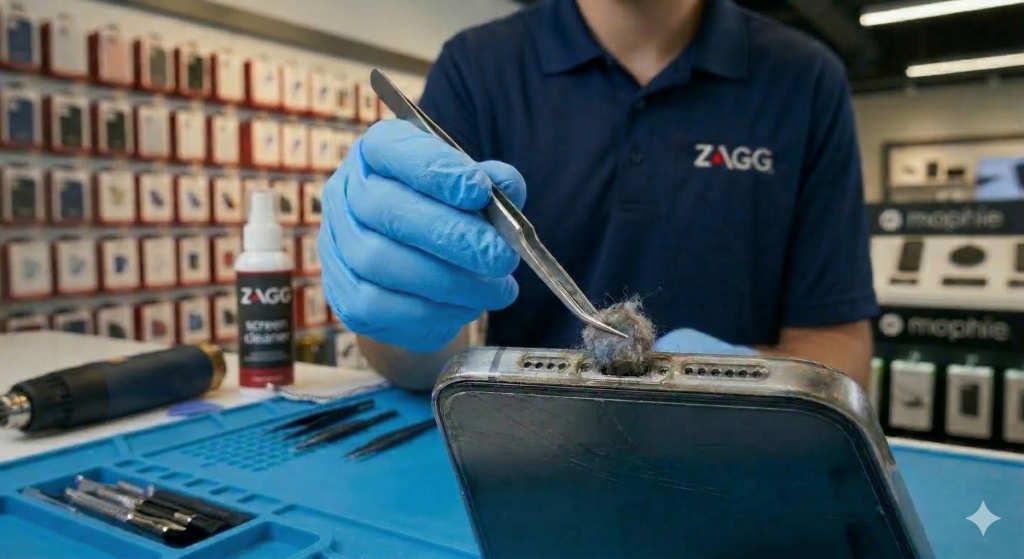
You may see lint or debris packed into the bottom of the port.
Step 3: Gently Remove Debris
Use a wooden toothpick or soft plastic tool to gently loosen debris.
Move slowly and carefully to avoid damaging internal connectors.
Remove lint a little at a time.
Step 4: Blow Out Remaining Dust
After loosening debris, gently blow into the port or use compressed air to remove remaining dust.
Be careful not to push debris deeper into the port.
If debris is stuck deep inside the port or the phone still won’t charge, professional cleaning may be required.
Visit a ZAGG Phone Repair location and a technician can safely clean the charging port.
When Cleaning Doesn’t Fix the Problem
Sometimes the issue isn’t debris.
If cleaning the port doesn’t solve the problem, other issues may be involved, including:
• worn charging port connectors
• water damage corrosion
• battery problems
• damaged charging cables
In these cases, professional diagnostics can identify the problem.
How Professionals Clean Charging Ports
Technicians use specialized tools to clean charging ports safely.
Professional cleaning may involve:
• precision cleaning tools
• magnification inspection
• removing compacted debris
• checking connector alignment
If the charging port itself is damaged, technicians can often replace the charging port assembly.
Protect Your Phone From Future Damage
Keeping your phone clean and protected can help prevent charging problems.
Helpful tips include:
• avoid carrying phones in lint-filled pockets
• keep charging ports away from dust and sand
• use protective cases when possible
• regularly inspect the charging port
Protecting your phone from drops is also important.
Installing a high-quality screen protector can help prevent costly screen repairs if your phone is dropped.
At ZAGG Phone Repair, technicians install InvisibleShield screen protectors designed to protect your device while maintaining clear display and smooth touch response.
When to Visit ZAGG Phone Repair
If your phone still won’t charge after cleaning the port, the issue may involve internal components.
Technicians at ZAGG Phone Repair can diagnose problems such as:
• damaged charging ports
• battery issues
• water damage corrosion
• charging system failures
Many charging problems can be resolved quickly with professional repair.
If your phone isn’t charging properly, don’t wait for the problem to get worse.
Visit ZAGG Phone Repair and let our technicians diagnose the issue.